
Stop retyping estimates into Procore.Save 2–5 hours per bid.
Build or import your estimate, map cost codes once, and push every budget line item to Procore in under 30 seconds — no spreadsheets, no double entry.
Why contractors choose ProBidCore
Built on Procore's official API
Secure OAuth 2.0 integration
No credit card required
14-day free trial, cancel anytime
Founder-led onboarding
Personal setup for the first 10 customers
Cut out double data entry
Estimate once, sync to Procore
< 30s
Average sync time
Measured in early access
2–5 hrs
Saved per estimate
Reported by beta users
3 trades
Mechanical · GC · Roofing
1-click
Push to Procore
How it works
Build → Push → Done
Build your estimate
Enter line items, or import a CSV. Totals calculate as you type.
Click Push to Procore
Sign in once with your Procore account. We do the rest.
Done
Your full budget shows up in Procore in under 30 seconds.
Stop Wasting Hours Rebuilding Estimates
Most contractors build estimates in Excel, then re-enter everything into Procore. ProBidCore eliminates that completely.
- Build estimate in Excel or on paper
- Manually retype every line item into Procore
- Double-check for typos across 50+ rows
- Repeat for every project, every bid
- 2–5 hours wasted per estimate
- Build or import your estimate in ProBidCore
- Click 'Push to Procore' — done in 30 seconds
- Zero manual re-entry, zero typos
- Every project syncs the same way
- Save 2–5 hours on every single estimate
You can. Most contractors do — until they try this.
Spreadsheets are great for building estimates. They're terrible for getting those estimates into Procore without an hour of copy-pasting.
| Spreadsheet + Manual | ProBidCore | Direct Procore Entry | |
|---|---|---|---|
| Time per estimate entry into Procore | 2–5 hours | < 1 minute | 2–5 hours |
| Risk of data entry errors | High | None | High |
| Live sync to Procore | No (manual export) | Yes — one click | Sort of (tedious) |
| Procore OAuth / official API | No | Yes | Yes |
| Cost code mapping | Manual | Guided wizard | Manual |
| Audit trail of every sync | No | Yes | No |
| Works with existing CSV estimates | Yes (but no sync) | Yes — import + sync | No |
Based on user-reported estimates from contractors using ProBidCore in early access.
Why this matters
Most contractors still build estimates in Excel, then manually re-enter line items into Procore. ProBidCore removes the double entry by letting teams build, import, review, and push estimate data into Procore through a structured workflow.
Wondering whether you could just build the budget in Procore directly? It’s a fair question — here’s an honest side-by-side.
ProBidCore vs. doing it in ProcoreHow much time could you save?
Adjust the numbers below to match your workflow. We use conservative assumptions — see the note at the bottom.
Your Estimating Volume
Assumption: ProBidCore saves 2 hours per estimate — the conservative lower bound of the 2–5 hours contractors typically spend re-entering line items from spreadsheets into Procore. Actual estimating time is not included.
Annual Time Savings
192 hrs
16 hrs/month × 12
Annual Value of Time Saved
$14,400
At $75/hr billable rate
96
Estimates/year
< 30s
Each Procore sync
See it in action
Watch ProBidCore connect to Procore, import line items, and sync a full estimate in under 60 seconds.
Live interactive demo — watch the full Procore sync workflow from start to finish
Real screens, real workflow
From estimate to Procore budget
Three steps, straight from the product — build your estimate, push it to Procore in one click, and watch every line item land in your budget.
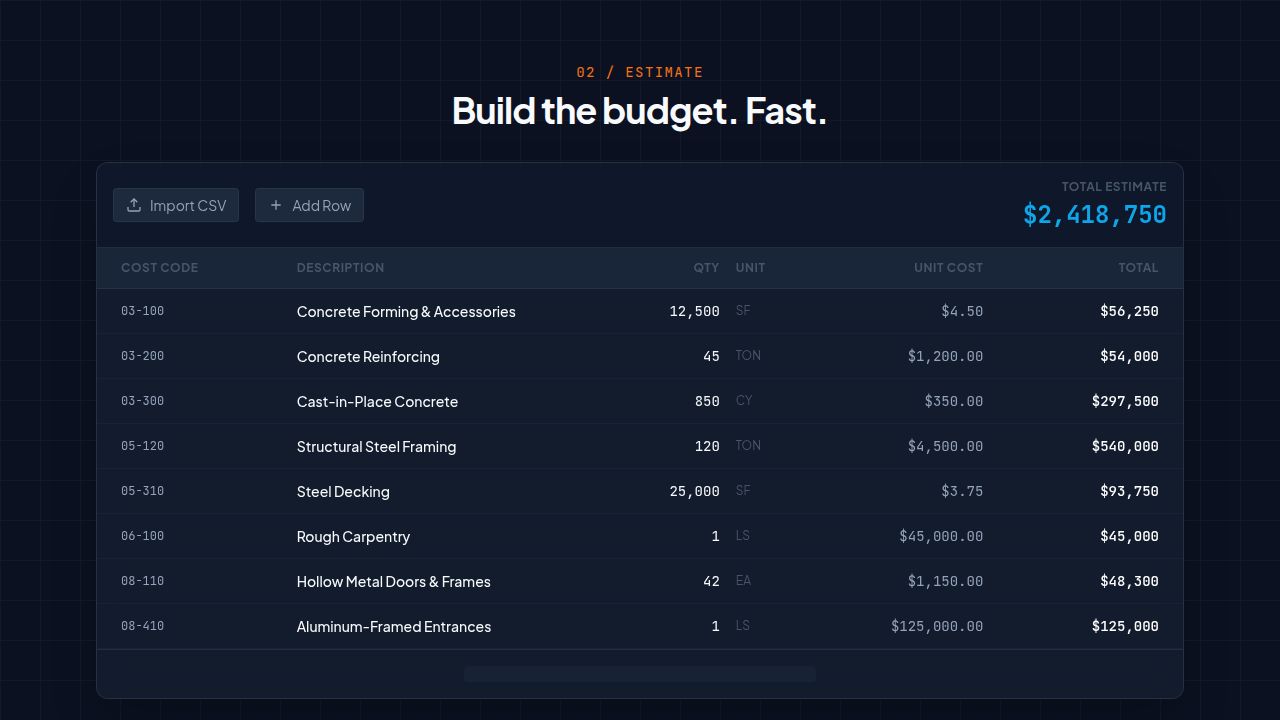
Build the estimate
Add line items by cost code or import a CSV. Totals roll up live as you type — here a $2.4M budget across 47 items.
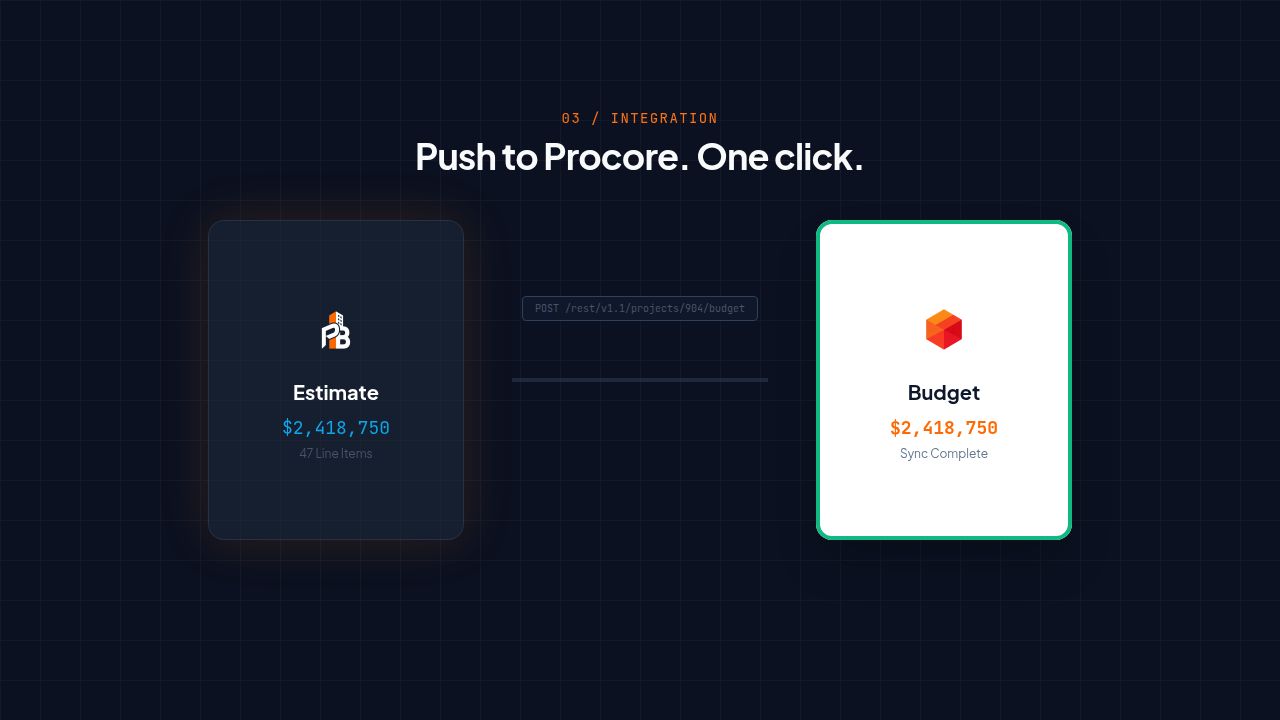
Push to Procore
One click sends the whole estimate to your connected Procore project over the official OAuth API — no copy-paste.
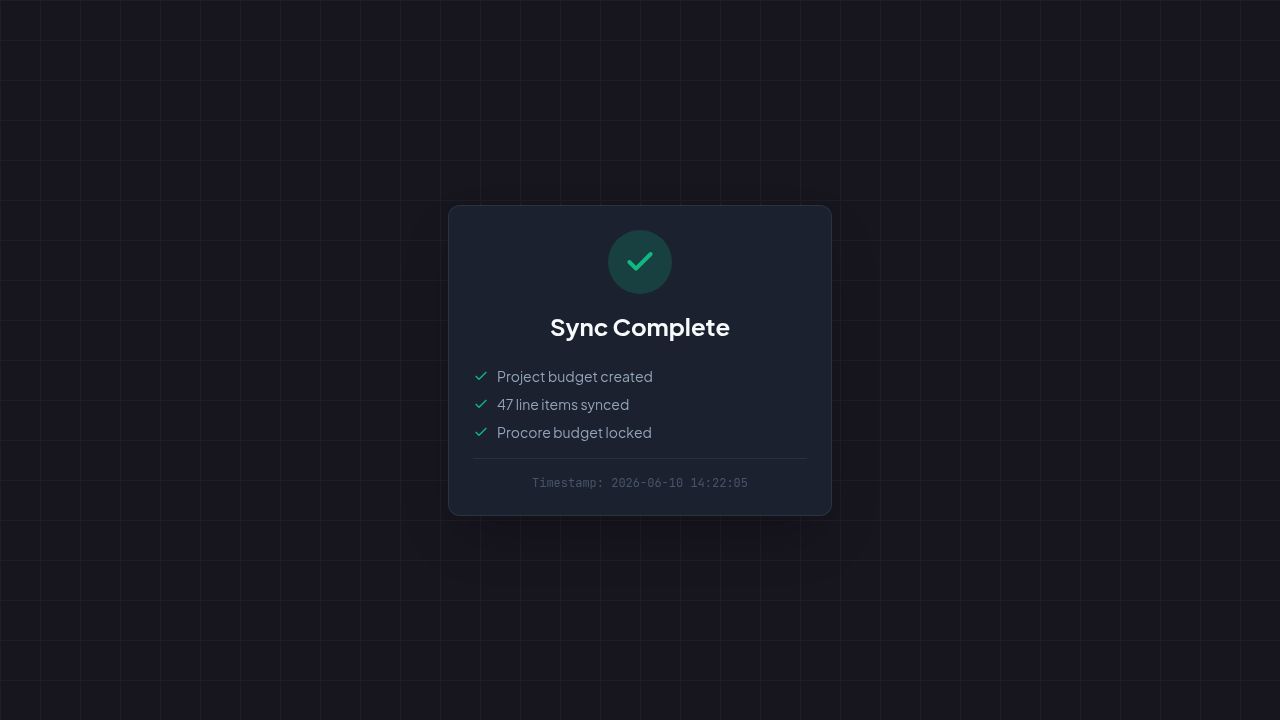
Synced and locked
Every line item lands in the Procore budget in under 30 seconds, with a confirmation log you can audit.
How it works
From estimate to Procore budget in four steps. No training required.
01
Create a Project
Enter your project name, description, and Procore Project ID. Takes 30 seconds.
02
Build Your Estimate
Add budget line items with WBS codes, cost types, quantities, and unit costs — or import from CSV.
03
Connect Procore
Click 'Log in with Procore' and authorize ProBidCore via OAuth 2.0. One-time setup per account.
04
Push to Procore
Click 'Push to Procore' on any project. Your budget line items appear in Procore within seconds.
See the actual product
These are live screenshots from ProBidCore — not mockups. The same three steps every contractor runs on bid day.
Build the estimate
Add line items by cost code or import a CSV. Totals roll up live as you type — here a $2.4M budget across 47 items.
Push to Procore
One click sends the whole estimate to your connected Procore project over the official OAuth API — no copy-paste.
Synced and locked
Every line item lands in the Procore budget in under 30 seconds, with a confirmation log you can audit.
Free 30-min walkthrough with the founder — we sync your first real estimate live.
Everything you need
Built specifically for contractors who use Procore for project management and need their estimates there fast.
Build Your Estimate
Enter WBS codes, cost types, quantities, and unit costs. ProBidCore calculates totals automatically in real time.
PDF Takeoff (Beta)
Upload plan PDFs, calibrate the drawing scale, then measure linear feet, areas, and counts directly on the page. Push any measurement into a line item with one click — no PlanSwift or STACK seat required.
One-Click Procore Sync
Push every budget line item to your Procore project budget with a single button. No CSV exports, no copy-paste.
CSV Import & Export
Import line items from a CSV spreadsheet or export your full estimate. Works with Excel, Google Sheets, and more.
Duplicate Projects
Clone any previous estimate as a starting point for new bids. Save hours on repetitive scope items.
OAuth 2.0 Secured
Connect your Procore account securely using the industry-standard OAuth 2.0 Authorization Code flow. Tokens auto-refresh.
Full Audit Trail
Every sync attempt is logged with a timestamp, status, and item count. Know exactly what was pushed and when.
Works While Procore Loads
Build your estimate in ProBidCore first — no waiting for Procore to be set up. Push when your PM is ready.
Manual Calculation Strategy
ProBidCore uses Procore's manual calculation strategy, which accepts your pre-calculated totals without overriding them.
Bulk Line Item Entry
Paste or import hundreds of line items at once. No more entering them one at a time through the Procore UI.
Every customer gets onboarded by the founder
Built by a contractor who got tired of double-entering estimates into Procore. When you sign up, you get a direct line to the person who built it — no sales reps, no support queues, no ticket numbers.
30-min setup call with the founder
I walk you through OAuth, your first sync, and answer anything in real time.
We import your first project together
Bring a real CSV or Procore project. We get your first budget synced live on the call.
Direct line for your first 90 days
Email or text me directly. No support queue, no ticket numbers.
Roadmap influence
What you ask for gets prioritized. You're talking directly to the person building the product.
30-minute call · with the founder · no sales handoff
Simple, honest pricing
14-day free trial on every plan. Cancel anytime. No setup fees, no surprises.
Starter
$99
/mo
or $83/mo billed annually
- Up to 5 projects
- Procore budget sync
- CSV import & export
- WBS codes, cost types, UOM
Pro
$349
/mo
or $291/mo billed annually
- Unlimited projects
- Live Procore sync
- Bulk project import
- Team collaboration
Business
$899
/mo
or $749/mo billed annually
- Everything in Pro
- Unlimited team members
- Advanced reporting
- Dedicated account manager
Built for how you work
Whether it's bid day, a change order, or managing a portfolio — ProBidCore fits your workflow.
Bid Day
Upload your takeoff spreadsheet, review totals, and push to Procore before the deadline.
Change Orders
Duplicate the original estimate, adjust quantities, and re-sync without affecting the first push.
Multi-Project GCs
Manage dozens of active bids in one dashboard. Know which projects are synced and which need attention.
AI estimates in 30 seconds. Synced to Procore instantly.
ProBid AI generates full labor and materials estimates from a photo or job description. ProBidCore imports them automatically and syncs directly to your Procore project budget. No spreadsheets. No retyping. The full pipeline.
- Upload a photo or describe the job on ProBid AI
- Get a detailed estimate with quantities and costs in 30 seconds
- One click sends it to ProBidCore for Procore sync
- Push to Procore budget — zero manual data entry
ProBid AI
AI-powered estimate generated
ProBidCore
Estimate imported — ready to sync
Procore
Budget synced — 24 line items pushed
Photo to Procore budget in under 2 minutes
Built on Procore's public API
ProBidCore uses Procore's REST API v1.1 with OAuth 2.0 Authorization Code Grant — the same security standard Procore requires of marketplace apps. Your credentials never touch our servers.
- OAuth 2.0 Authorization Code Grant
- Scopes: budgets:read, budgets:write, projects:read
- Automatic token refresh every 2 hours
- Budget lock detection before sync
- calculation_strategy: manual — no overwrites
// POST /rest/v1.1/budget_line_items
{
  "project_id": 123456,
  "budget_line_item": {
    "wbs_code_id": 987654,
    "description": "Concrete Foundations",
    "original_budget_amount": "94325.00",
    "uom": "CY",
    "quantity": "245",
    "unit_cost": "385.00",
    "calculation_strategy": "manual"
  }
}
Built on Procore's Official API
Procore REST API v1.1
Official API integration
OAuth 2.0 Authorization
Industry-standard secure auth
Auto Token Refresh
Tokens refresh every 2 hours
Budget Sync in < 30s
Push all line items at once
Marketplace App Submission
Application in progress
Built around real estimating workflows.
Feedback from contractors during our early access program. Their names and companies have been anonymised at their request.
Mike T.
Beta tester — name anonymised
Mechanical contractor, Rocky Mountain region
Mechanical Contractor · Colorado
“Used to spend 2 hours re-entering every estimate into Procore. Now it's one click. First sync took about 45 seconds.”
Jason W.
Beta tester — name anonymised
General contractor, Southwest US
General Contractor · Arizona
“We bid 8–10 jobs a week. The double entry was killing us. ProBidCore plugged straight into our Procore workflow with zero issues.”
Dave R.
Beta tester — name anonymised
Roofing contractor, Mid-South
Roofing Contractor · Tennessee
“Setup took 10 minutes. Had our first budget in Procore before the call was over.”
Chris P.
Beta tester — name anonymised
Specialty contractor, Pacific Northwest
Specialty Contractor · Oregon
“Connected to Procore in 15 minutes. My PM was impressed when the full budget showed up before our kick-off call.”
Ray M.
Beta tester — name anonymised
Commercial GC, Southeast US
General Contractor · Georgia
“We were copy-pasting 40–60 line items per job. Now it's a button click. Whole team is on it.”
< 30s
Average sync time
Measured in early access
2–5 hrs
Saved per estimate
Reported by beta users
3 trades
Mechanical · GC · Roofing
1-click
Push to Procore
See it work on your actual project
Bring a real estimate — CSV, spreadsheet, or Procore project. We'll walk through a live sync together and answer any integration questions on the spot.
Find your trade + city
ProBidCore for contractors by trade and metro
See how ProBidCore fits your specific trade workflow — from general contractors in Chicago to HVAC subs in Dallas.
Stay in the loop
Get product updates, Procore integration tips, and early access to new features. Join contractors already saving hours every week.
Free updates on Procore integration tips, product news, and early access to new features.
Ready to stop the copy-paste?
ProBidCore is free to try. Connect your Procore account and push your first budget in under 5 minutes.
No credit card required for free tier.